Inspector
The Inspector is one of the core tools of the World Editor. It displays the main properties of any selected object.
The sections and relative properties displayed depends on the class (type) of the selected object.
Some sections of the Inspector are common to the majority of the objects’ classes. Below is a selection of the most common ones.
Basics
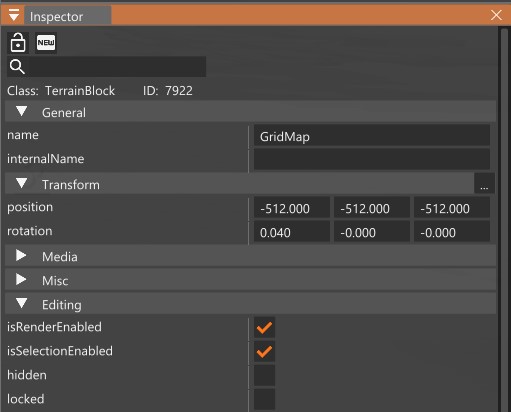
Element
Description
Element
Lock inspector to selected object
Description
If enabled, the content of this inspector window will be locked and won’t change when selecting another object. Combine this with other inspector windows to view multiple object’s properties at the same time
Element
New inspector window
Description
Shortcut to add a new inspector window to the World Editor layout
Element
Search Bar
Description
Quickly search for a property
Element
Class
Description
The class (type) of the selected object
Element
ID
Description
The ID number of the selected object
General
Element
Description
Element
Name
Description
Name of the selected object. Custom names must be unique
Element
internalName
Description
For developer use
Transform
Element
Description
Element
Position
Description
coordinates of the selected object (X, Y, Z)
Element
Rotation
Description
rotation of the selected object (X, Y, Z)
Editing
Element
Description
Element
isRenderEnabled
Description
Whether the object is rendered or not*
Element
isSelectionEnabled
Description
Whether the object can be selected or not*
Element
hidden
Description
Hides the object*
Element
locked
Description
Locks the object, no editing will be allowed*
Last modified:
April 19, 2021
Was this article helpful?